
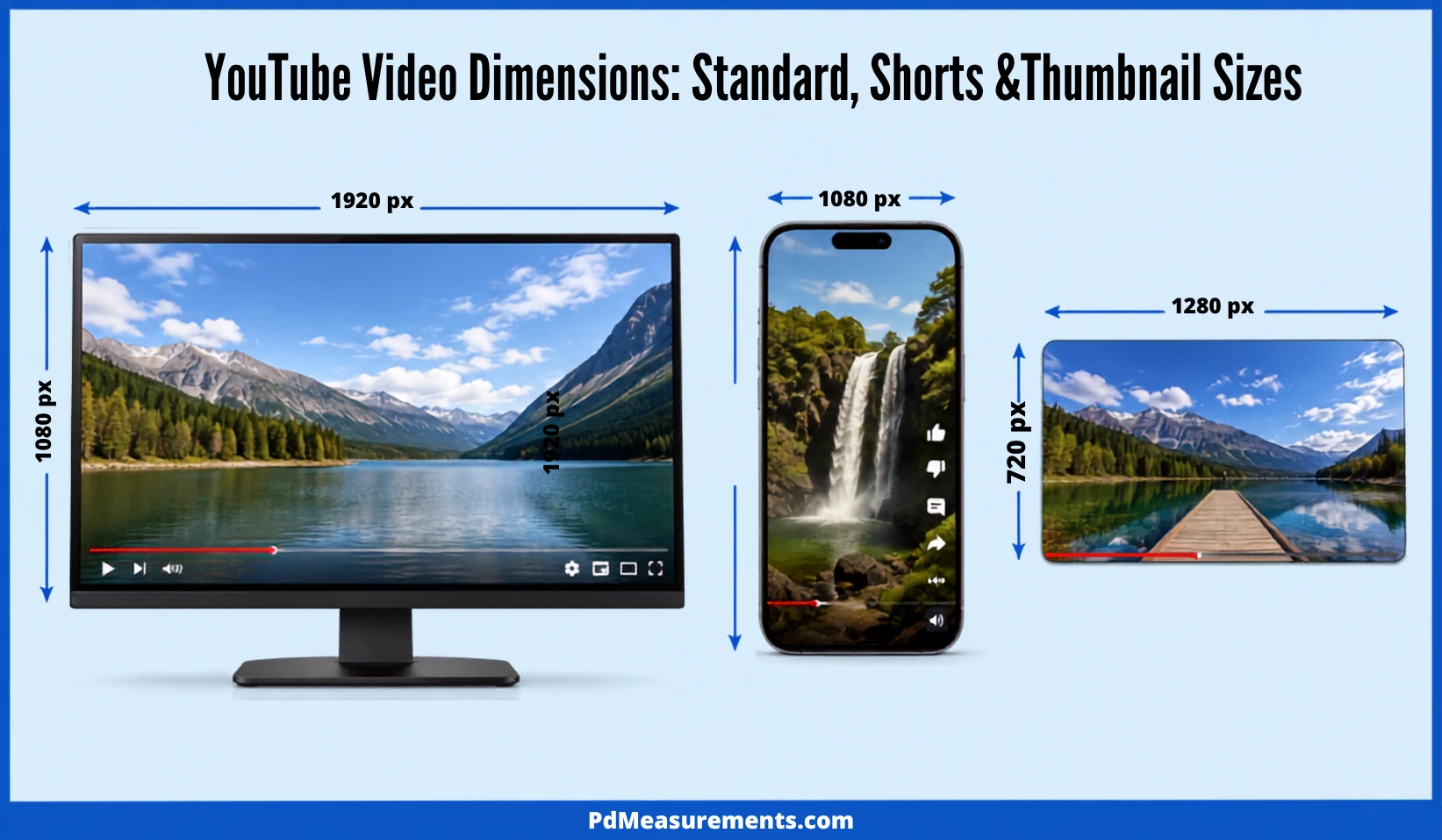
The correct YouTube video dimensions are 1920×1080 pixels in a 16:9 aspect ratio for standard uploads. For Shorts, flip that to 1080×1920 in a 9:16 vertical frame.
This guide breaks down every YouTube video dimension, resolution, and aspect ratio you’ll need — plus a few things most guides skip, like bitrate, safe zones, and ad specs.
YouTube Video Dimensions Explained: Resolution vs. Aspect Ratio vs. Pixel Size
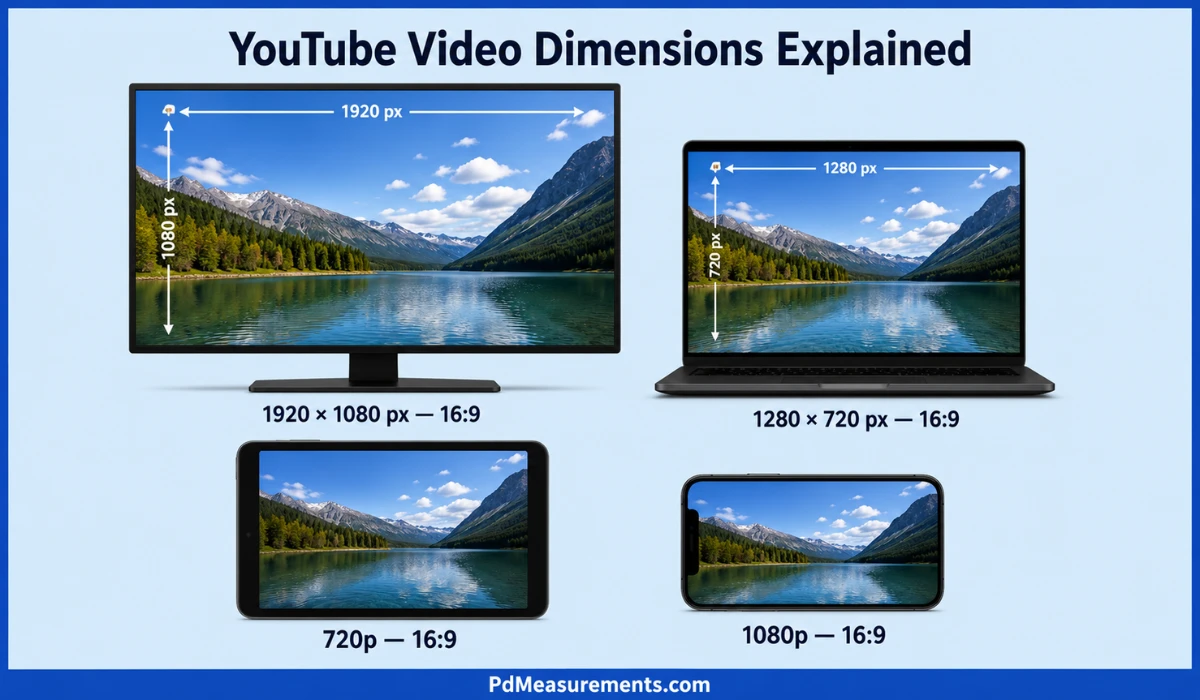
What are YouTube video dimensions? They’re the pixel width and height of your video file — like 1920×1080. Think of dimensions as the actual size of your canvas.
Aspect ratio is different. It’s the shape of that canvas, written as a ratio like 16:9 or 9:16. Two videos can share the same shape but have totally different pixel counts.
Resolution tells you how much detail lives inside that shape. 720p and 1080p are both 16:9, but 1080p packs in more pixels — so it looks sharper on a big screen.
Here’s the simple version: aspect ratio decides the frame, dimensions decide the canvas size, and resolution decides the sharpness. Get all three aligned, and your video looks clean everywhere.
Why does this matter? A mismatched dimension causes black bars (called pillarboxing or letterboxing), stretching, or blur. That hurts watch time, which is one of the signals YouTube’s algorithm tracks when deciding what to recommend, according to YouTube’s Creator Academy.
YouTube Video Dimensions Chart: Every Resolution From 240p to 8K
Here’s the full YouTube dimensions chart for standard 16:9 video, from the lowest supported quality to the highest YouTube currently accepts.
Is 1920×1080 or 1280×720 better? 1920×1080 wins for almost every use case. It has roughly four times the pixel count of 720p, so text, faces, and fine detail hold up far better on laptops, TVs, and monitors.
Is 1920×1080 or 1440×1080 better? 1440×1080 isn’t a standard YouTube dimension — it’s a 4:3-leaning size that doesn’t match YouTube’s 16:9 player. Stick with 1920×1080; it fits the frame natively without cropping or bars.
Most creators never need anything above 1080p. YouTube automatically transcodes your upload into several lower-resolution versions anyway, so viewers on slow connections still get a smooth stream.
More Post:Arizona Tea Can Dimensions: Big Can, Slim Can & Size Chart
YouTube Aspect Ratios & Dimensions by Video Type
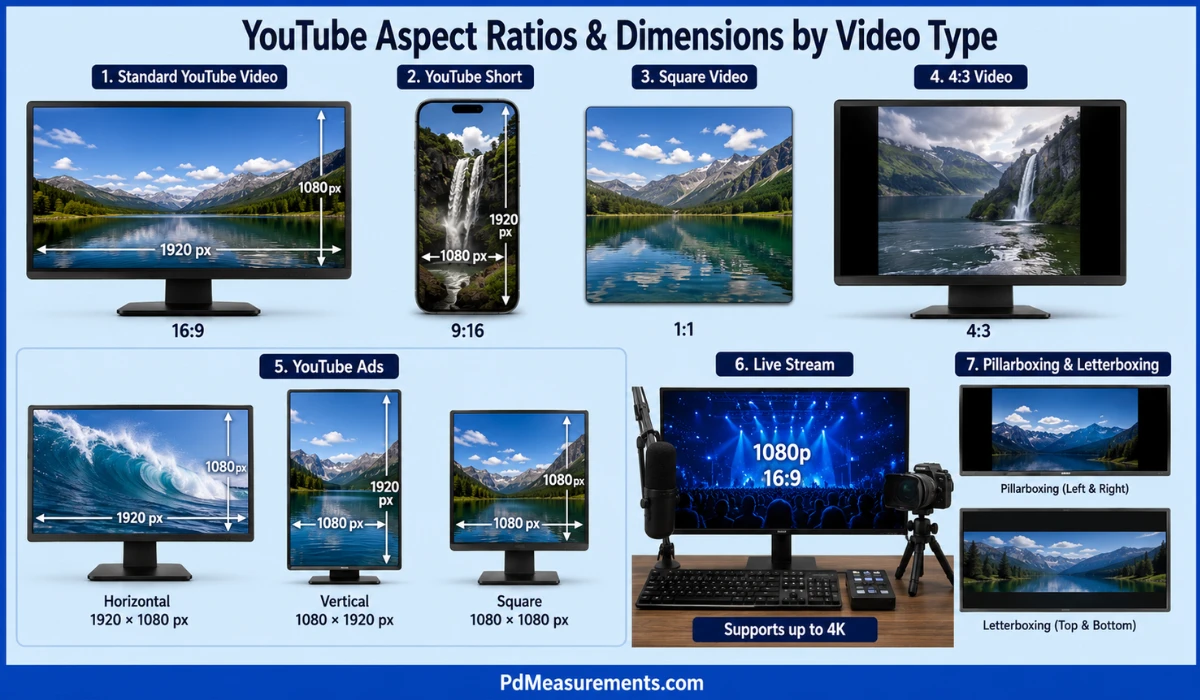
Not every YouTube video uses the same shape. Here’s how dimensions shift depending on what you’re publishing.
Standard videos stick to 16:9, with 1920×1080 as the sweet spot. This ratio became the default because it splits the difference between old boxy 4:3 TVs and ultra-wide cinema formats — wide enough to feel modern, narrow enough to play cleanly on any screen.
YouTube Shorts use 9:16, sized at 1080×1920. A 1:1 square upload also qualifies as a Short. Vertical framing fills a phone screen edge to edge, which is exactly how most Shorts get watched.
Square (1:1) and 4:3 formats still play on YouTube, but they trigger pillarboxing — black bars on the sides — when viewed on desktop. Mobile playback adapts automatically, so the bars mostly show up on bigger screens.
YouTube ads run in three shapes depending on placement: 1920×1080 (horizontal), 1080×1920 (vertical), and 1080×1080 (square). Most guides skip this, but if you’re running paid promotion, matching the right ad dimension avoids awkward cropping in the feed.
Live streams also default to 1080p at 16:9, though YouTube supports up to 4K live for channels with the bandwidth to push it — a detail most dimension guides leave out entirely.
Pillarboxing puts bars on the left and right. Letterboxing puts them on top and bottom. Both happen when your video’s shape doesn’t match the player — the fix is simple: shoot and export in the ratio you plan to publish.
YouTube Thumbnail, Channel Art & Profile Image Dimensions
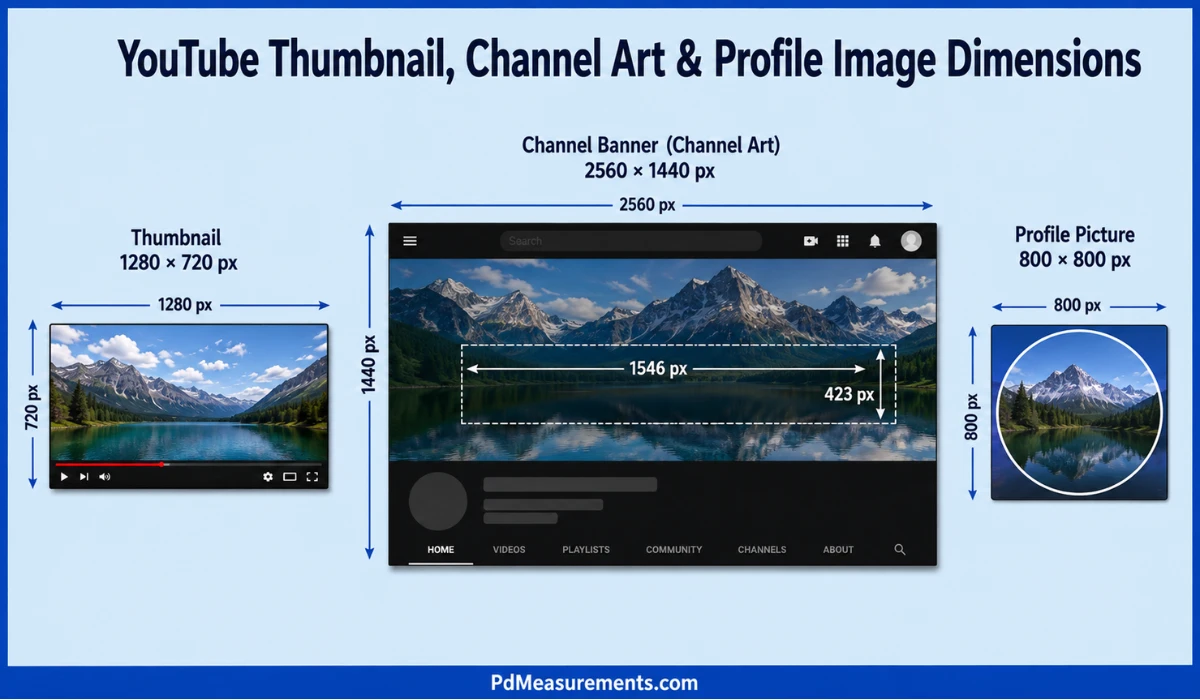
Video isn’t the only asset with strict sizing rules. Your channel’s visual identity depends on getting these right too.
Thumbnail dimensions should be 1280×720 pixels, matching the 16:9 shape of your video. The minimum accepted width is 640 pixels, and files must stay under 2MB in JPG, PNG, or GIF format.
Channel banner dimensions run larger — 2560×1440 pixels. But here’s what most guides don’t mention: only the center 1546×423 pixel zone is guaranteed visible across TV, desktop, and mobile. Anything outside that “safe area” risks getting cropped on certain devices.
Profile picture dimensions are a simple 800×800 pixels, displayed as a circle. Keep your logo or headshot centered, since the edges get clipped by the circular mask.
How to Get Your YouTube Video Dimensions Right
Dimensions are only half the equation. Format, bitrate, and safe zones determine whether your video actually looks as good as its pixel count suggests.
Format matters. YouTube’s own upload guidelines recommend MP4 with an H.264 video codec and AAC audio codec. This combo balances file size with quality better than older formats like AVI or WMV.
Bitrate — a detail almost every YouTube dimensions guide skips — is what actually determines file quality at each resolution. For 1080p at 30fps, YouTube recommends roughly 8 Mbps; for 4K, that climbs to around 35–45 Mbps. Undershoot the bitrate and even a correctly-sized 1080p video looks soft or blocky.
Safe zones matter for anyone adding text, captions, or graphics. Keep important elements inside the center 90% of the frame — the outer edges can get trimmed on certain TVs and older devices.
Resizing footage between dimensions is common when repurposing one video into several formats. Editors like Descript and Riverside offer one-click aspect-ratio switching, while tools like BIGVU’s auto-crop use subject tracking to reframe a 16:9 video into 9:16 without manual cropping.
FAQs About YouTube Video Dimensions
Is a YouTube video 1920×1080?
Yes. 1920×1080 is the most common and recommended dimension for standard YouTube uploads, delivering Full HD quality in a 16:9 frame.
Is YouTube 16×9 or 4×3?
YouTube’s standard aspect ratio is 16:9. The older 4:3 format still works but displays with black bars on the sides.
What size is a 1920×1080 video frame?
A 1920×1080 frame measures 1920 pixels wide by 1080 pixels tall, giving it a 16:9 aspect ratio and Full HD resolution.
Is 1920×1080 or 1280×720 better?
1920×1080 is better for most creators. It has significantly more pixels, resulting in sharper and clearer visuals.
Is 1920×1080 or 1440×1080 better?
1920×1080 is the better choice. It matches YouTube’s native 16:9 format, while 1440×1080 does not.
Is 1920×1080 a 16:9 ratio?
Yes. Dividing 1920 by 1080 equals 16:9, which is why it’s the standard for HD video.
Is 1920×1080 height or width?
In 1920×1080, 1920 represents the width and 1080 represents the height. Dimensions are always written as width × height.

Rehmaan Khan is a Measurement Content Researcher Specializing in PD measurements, Size Guides, Charts, and Simple Educational Measurement Content.